Tag: website development

  • How to Publish Your HTML Website Free

    How to Publish Your HTML Website Free

    As a beginner in web development, you have done a basic CV HTML website using just only HTML codes and inline CSS. Now that your CV website is complete, let us host it and publish it online.

    publish your HTML website online

    To publish a website online requires many steps, you have to be able to get a domain name, get a hosting plan from a hosting company, etc. And all of these would cost money. As a beginner, you may not have the money to achieve all of these. Hence, we chose this method of hosting and publishing our HTML website on GitHub for free.

    The website itself is hosted locally or better still can only be accessed and seen by us, the people or person that wrote the HTML code. As shown in image below:

    publish your HTML website: the local address
    publish your HTML website: the local address

    The address here shows the “local” user address as it points to the user’s file location. So we need to make it accessible to all who want to visit our personal CV website.

    GitHub Hosting Services

    GitHub homepage: Using GitHub as server for hosting your HTML CV website
    GitHub homepage: Using GitHub as server for hosting your HTML CV website

    The GitHub page is what will help us achieve this feat and cut down on the cost of web hosting and domain name. We will be dealing with GitHub on a broader level soon. For now, let us stick to using it to host the the HTML CV website.

    If you don’t have already, a GitHub account; you have to sign up. However, if you did, you can just proceed to login into the account. This of course will require your email address and your password.

    However, on the sign-up page, you can input your email address, create a password, choose a username that is available then finish your signing up process.

    publishing your HTML website online
    Choosing a GitHub plan

    Of course you will be presented with the options of either going with the free plan on GitHub or the paid developer version. You can go with the free version since that is the idea behind free hosting. Don’t worry, when you are buoyant, you can upgrade your plan.

    Next, ensure that you verify the email that GitHub sent to your mailbox. IF not, the rest of the process won’t work. After you have verified your email, you can proceed to the next stage.

    Adding A New Repository On GitHub to Publish Our HTML Website

    adding a repository on GitHub to publish your HTML website
    adding a repository on GitHub to publish your HTML website

    On your home dashboard on GitHub, you can see the two ways you can use to add a GitHub repository to your new account. You can choose to click on the (+) button on the upper right side of the pane very close to your profile avatar, or you can simple click on “New”.

    GitHub repo

    The latter would simply open up a page where you can input the details of your new repository (repo), whereas the former will show you many options ranging from creating a new repo to a new project. Our goal here is to create a new repo. Hence, we just selected this.

    Now, you can name your repository. Pick a name that you think it is best for it. For us, we used the name, CV. You can decide to use anything that you think best suits you.

    It is important to ensure you include the name of the repository. A repository is a is like a folder store on the cloud for you. And in this case, you can save all your files or even folders inside the named repository. Also, ensure you keep the description empty, or you can add a little description and then check to make sure the repo is public. Check the README file to add a README file to your repo. Finally, create your repository.

    adding files to your github repository
    adding files to your github repository

    So we created this repo named IoT_based_Solar_Tracker and this is what it looks like. Now, to publish your HTML website on this server; click on Add file and it will open a window where you can upload your file that contains your HTML codes.

    Under the Commit Changes, include the the statement for the commit and ensure that it is it is commited directly to the main branch. The click on commit changes.

    Click on Settings of this repo. And on the left hand side you can see the pages, click on this to reveal the GitHub Pages,

    Change the source from None to Master branch and save it. Once this is done, GitHub will do behind the scene work to upload your HTML website to their server and publish it for you.

    The link to the GitHub HTML website
    The link to the GitHub HTML website

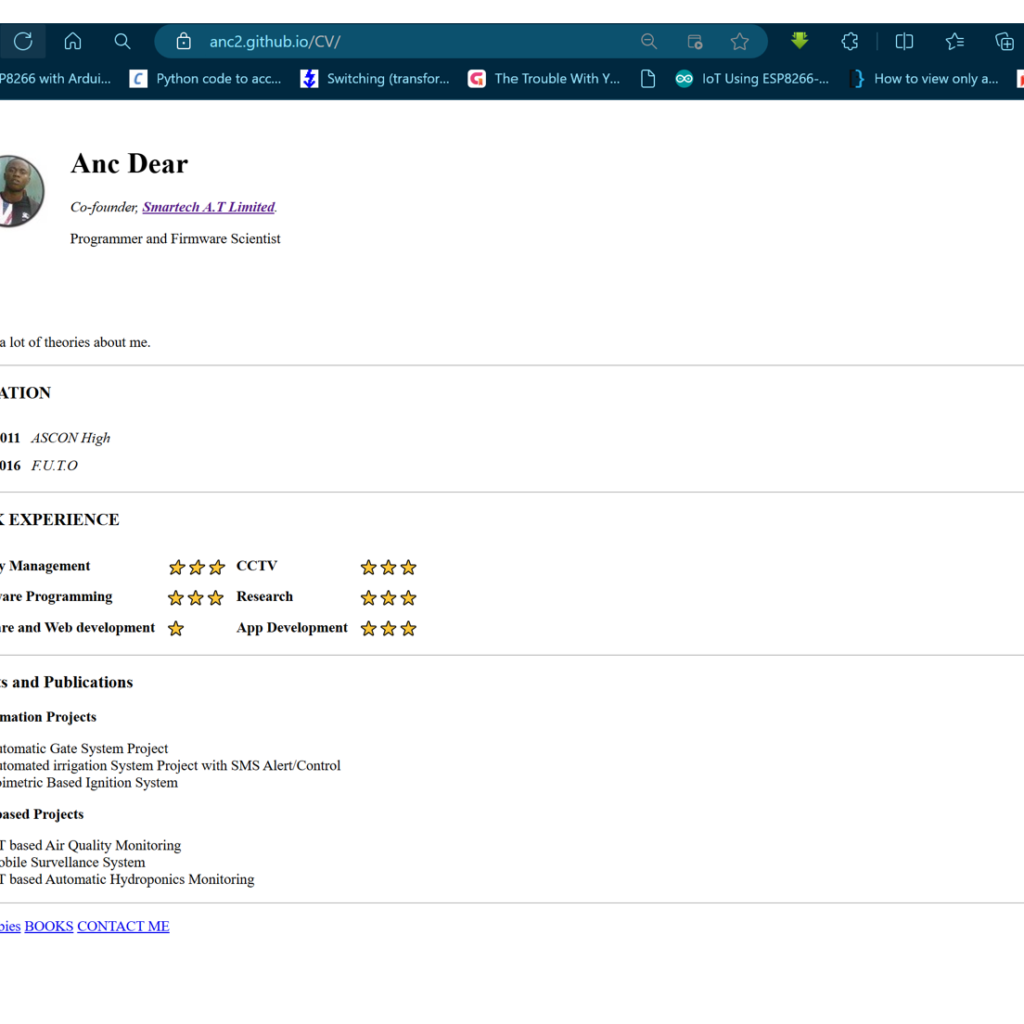
    Now, when you click on this link and you will see your published website.

    publish your html website
    publish your html website

    Conclusion

    As shown in the image above, we have successfully use the GitHub server to host our HTML personal CV website. This approach is the best way to publish a website that you can’t really afford to pay for server space and domain name hosting.

    Practice Questions

    Do the same for your CV HTML code and send a screenshot to the group

  • How Does The Internet Work? An Introduction to Web Development

    How Does The Internet Work? An Introduction to Web Development

    How does the Internet work
    How does the Internet work

    How does the internet really work? We use the internet nowadays, and we take it for granted in the slightest. Before we start designing and creating some amazing websites and online apps. It is imperative that we comprehend the basic principles behind the operation of the internet.

    how does the internet really work: The internet submarine cable under the sea
    how does the internet really work: The internet submarine cable under the sea

    That said, what precisely then is the internet? It may seem extremely complicated and challenging to comprehend, yet that’s not the case at all. The internet is quite easy to understand. It is essentially just a lengthy wire that joins many computers to one another.

    The server and clients of the internet
    The server and clients of the internet

    So you might have one computer that’s in Lagos, Nigeria and another computer that’s in Yaoundé, Cameroun, and they can talk to each other and transfer data through this giant wire. Now some of these computers attached to the internet have a very special job. They have to be online 24/7 ready to serve you all of the data and files that you are requesting when you try to access the websites. These computers must be on doing this job. We call this type of computer a server and the computer that any user would use to access the internet, is called a client.

    How the internet works: The internet as a giant library
    How the internet works: The internet as a giant library

    You may now visualize the internet as an enormous library that is accessible to you at any time of day, around the clock. Additionally, you may say, “I want to see Smartech homepage.” Alternatively, any other website would do. Additionally, it will provide you with all the files and information you require in order to visit the website you requested. Imagine a library this size, able to accommodate all of these webpages. Then you can probably run into trouble finding exactly what you’re looking for in this enormous library very quickly, right? How does the internet help us solve this problem?

    Let’s say that you’re sitting at home on your computer and you type in smartechmolabs.com. This is because you want to see the Smartech homepage. What happens when you do this on your browser? The browser will send a message to your internet service provider (ISP). So if you are in Nigeria, for example, that would be network providers like MTN, Airtel, or Globacom. Now the message that you sending, would be like “I want to see smartechmolabs.com,”. The ISP would send this message to a Domain Name System (DNS) Server, which is essentially just a souped-up phone book.

    How does the internet work: DNS server
    How does the internet work: DNS server

    What really happens when this request is made is that, the DNS looks up the Internet Protocol (IP) address of the website on its database. It is worth noting here that every computer on the internet has a specific IP address. You can think of the IP address as your postal address that is used to send and receive mails.

    Now, when the DNS server finds the IP address of the website you are requesting for, it sends that back to the client computer through the ISP. And once this is received, you can start seeing your browser sending the request to this IP address through the internet backbone, an analogy that defines the internet submarine cable that is all around the world..

    The internet backbone
    The internet backbone: the internet submarine cables round around the world

    This means that for someone in Mexico City, Mexico in North America wants to request to see a website that is hosted in Lagos Nigeria, his/or her browser has to make a request via the internet backbone to have access to such data. And this request has to travel through the transatlantic cable to get to Lagos, Nigeria. This request is basically, I want to see the website at this IP address and this is the server the website is hosted and once the server receives this message, it returns with all the information requested through the internet backbone. Hence, the website is served up and displayed to the user’s computer in New Mexico City.

    smartech homepage
    smartech homepage

    Conclusion

    You can try this out yourself and use a different website address. Take Google for example and you can see exactly how the internet work. Additionally, you can check out the internet backbone on this site here. They have pretty interesting details on how the internet has travelled round the globe.

    Read Related Posts Like This…

    FAQs on How Does The Internet Work

    1. What is the internet and how does it work? The internet is a global network of interconnected computers that communicate using a standardized set of rules known as protocols. It works by routing data packets between devices using a system of interconnected networks.
    2. What are the basic components of the internet infrastructure? The basic components of the internet infrastructure include routers, switches, servers, and transmission lines (such as fiber optic cables) that connect networks together.
    3. How do devices communicate over the internet? Devices communicate over the internet using a protocol called TCP/IP (Transmission Control Protocol/Internet Protocol), which breaks data into packets, routes them to their destination, and reassembles them into the original data.
    4. What is the role of IP addresses in internet communication? IP addresses are unique identifiers assigned to devices on a network. They allow devices to send and receive data to and from specific destinations on the internet.
    5. What is the difference between the internet and the World Wide Web? The internet is the infrastructure that allows for global communication between devices, while the World Wide Web is a collection of websites and web pages that are accessible over the internet.
    6. How are data packets transmitted and routed over the internet? Data packets are transmitted over the internet using a series of routers that determine the best path for the packet to reach its destination based on the destination IP address.
    7. What is the importance of protocols like TCP/IP in internet communication? Protocols like TCP/IP ensure that data is transmitted reliably and efficiently over the internet by breaking it into packets, routing them to their destination, and reassembling them in the correct order.
    8. How do domain names and DNS servers work in relation to the internet? Domain names are human-readable names that correspond to IP addresses. DNS (Domain Name System) servers translate domain names into IP addresses so that devices can locate each other on the internet.
    9. What are the different types of internet connections available? There are several types of internet connections, including dial-up, DSL, cable, fiber optic, and satellite, each offering different speeds and levels of reliability.
    10. How has the internet evolved since its inception? Since its inception, the internet has evolved from a simple network for academic and military use to a global communication platform that connects billions of people and devices worldwide.